Waar ondernemers en marketeers groeien
Trends & inspiratie
 Overslaan en naar de inhoud gaan

November 6th our junior Drupal developers got to attend their very first DrupalCamp.
Well, maybe not planes. Still, it was quite the trek to make on an early Friday morning. But we all arrived safely, and even had enough time left to take advantage of the free caffeine. Yep, they know how to woo developers.
Schedule in hand, we parted ways so we could catch as many presentations as possible. Below are the ones I found most interesting.

This wasn’t a technical talk, but it was still informative and discussed something that is often overlooked when building a site: the user experience.
Drupal isn’t an off the shelf product. You (usually) don’t download Drupal core and build an entire site with just that. The modular nature is what makes Drupal powerful: the contributed modules and ease of making custom modules. But that’s also why it’s so difficult to produce a unified user experience.
One example is how Drupal (or rather, the many modules that make up Drupal) handles popups.
CKEditor Link, Scald Atoms, File Entity, the Core overlays; these all look completely different even though they’re the same thing - a popup. The result is a disjointed UI, which is confusing for non-techies. Every time they open a new popup, they have to deal with an entirely different UI with different rules: different positions for the close buttons, different ways to mark required fields or errors, etc. It ruins productivity.
Another big problem is Drupal’s reliance on structured content. A marketeer can’t quickly throw together a page by adding a title asset, an image asset, a body asset and a button asset. Those are all separate fields, and those will have to go in a separate content type. So the marketeer is stuck until a site builder creates everything.
There are answers, but they’re equally technical and even more difficult to understand (Panels-based Panopoly, for example). A solution Amplexor uses is Paragraphs, patched and updated to work inline so the user never has to leave the frontend.
Each “field” becomes a different type of paragraph, so you can add a title paragraph, and a body paragraph, and a “two column” paragraph where you can nest even more paragraphs. It looked powerful, and user friendly. But you still need to build a library of paragraphs, and no matter how many you make, it will never be enough.
There may not be a quick and easy solution, but for me it was an eye-opener. As a pure backend dev, I pay far too little attention to UI and UX in general.
The slides and presentation can be found here.
Given by Lauri Eskola, the Maintainer of the Drupal Theme System.
This guy. This guy knew what he was talking about, which makes sense because he’s the one who built it.
He took us through the theme layer, from hook_theme to the template file. Which are all you need. Theming functions are out, they’ve all been replaced with template files and the hooks in blue are optional.
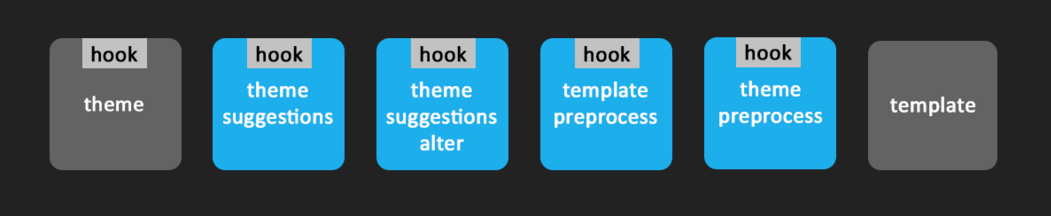
If your theme is called “sandwich”, all you need is a “sandwich.html.twig” template in a templates folder.
He also gave a quick rundown of Twig and how to create your own Twig extensions. Create a “trim” extension and someone can easily trim a string right there in the template without needing to know any PHP. Pure front-enders rejoice!
Auto-escaping is also in, so if you want to pass markup to your template you should use the FormattableMarkup class, but #markup render arrays still work too. Use #markup sparingly though, #prefix and #suffix as well for that matter. For short strings it’s fine, but in Drupal 8 these now get XML filtered and running an XML filter on large pieces of texts is mighty expensive. So whenever possible, use the FormattableMarkup class.
For more information, I highly recommend looking at the slides, downloading the sandwich demo module and checking out the Pistachio theme.
Another great talk by one of the creators of Drupal’s caching system. This was the same talk given in Barcelona, though Wim Leers couldn’t make it. But even though he was flying solo this time, Fabian Franz gave a great presentation nevertheless.
Drupal 8 is as fast as it is (and it is fast!) because of dependencies. Dependencies everywhere. And dependencies result in better cache invalidation. This makes it more complicated to set up, but it’s also a lot more powerful.
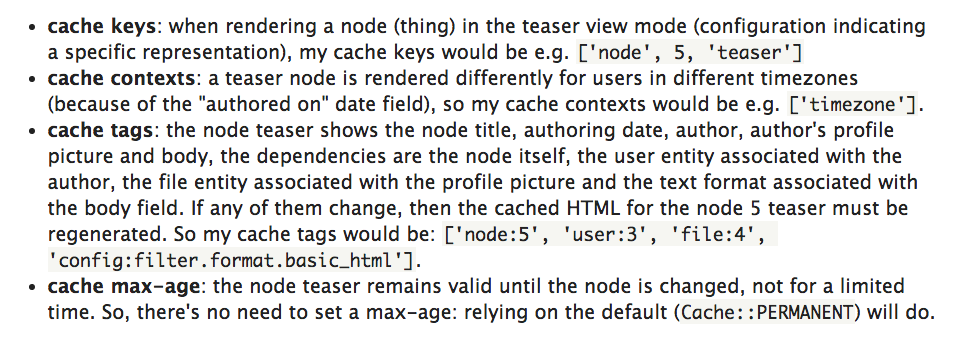
Each render array can be cached separately, by adding tags, contexts, keys and setting the max-age.
Cache tags tell Drupal that if an entity with these tags is updated, this cache should become invalidated.
Cache contexts are essentially Vary headers. If your render array changes its output based on the user entity, you should set users as a context.
Cache max-age is exactly what it says. You can invalidate cache after a certain time, disable caching entirely by setting it to 0, or leave it as permanent and let the tags handle invalidation.
An example from drupal.org
But even so, Drupal wasn’t as fast as it could be. Enter Big Pipe and placeholders. Using the Big Pipe module (soon to be added to core) and rendering strategy, the html sent to the browser only contains static content and placeholders. Upon loading the page, those placeholders are replaced with their actual content. This way the user is served a page immediately, and any dynamic content is injected into the page later. Even after your render array’s cache has been invalidated, it won’t impact the page load because the page cache still exists with your simple placeholder.
It’s definitely worthwhile to read the slides, and most of the information regarding caching is already available on drupal.org. The original Barcelona talk can be viewed here.
I attended more presentations, but these were the ones I found most interesting.
Be sure to check out the Drupal User Group on YouTube for even more presentations.
-- Nick Vanpraet, Junior Drupal Developer